Testnet · Updated 22 Oct 2026 · 3 min
Try it on testnet
Practice a full rescue with test wallets and test tokens before using real funds.
The test site runs the same app on test networks, so you can go through a whole rescue with nothing at stake. This page replaces the old Notion guide and follows the current flow: no wallet connection is needed to sign, and gas is paid from a small sponsor wallet the app creates for you.
1. Pick a test wallet
Use one of these as the compromised wallet.
These are public test keys. Never send real funds to them.
| # | Private key | Address |
|---|---|---|
| 1 | 0x035a351a9fd07e46393aacf674a46b901c3d6b2bbd9fc765dd4837c421fcc8b0 | 0xa846082FBc95a0440B06eDC052110654C7077302 |
| 2 | 0xa66b93321ef2d5ec0a7c91cd4d1a48e207844d79aeda92b37c74b4c88dd96d99 | 0x2b9Ee1F242753cA97f4341cC19C9A66C2C327867 |
| 3 | 0xf3e8305315dc749ffd22e1746b54e6f1d0a7dd99cb1057f287eb52f2c1080603 | 0x535f45Bb6395f7359A1976F353D9764C1ff4929b |
| 4 | 0xfaa0e0458220c08c240d6345eb5e78f2c76c55b96a5a40b80e135ea0dd27ef00 | 0x3B7477E97eE7B815C511339682a4f6Ab3D17FF46 |
| 5 | 0xf620c3c7369ec28b79d8c45ecce4771551b6478097cc6d6e57cb45e8d9c707a8 | 0x31C3C2758e40ee074c24e0433FD48d2573098C84 |
| 6 | 0x31e0e2970d85a7ee51f5f6b92fd4b67894242208829a685a3285fd8023ac87d2 | 0x026166083fB996b22A67082266A7Bc24051c1C98 |
| 7 | 0x15f0bffd9940d7a759e551461afaba80d172c3ae6fc76c141753c91f4c6214fe | 0xe6b2Ca17eC2C72d4Fd4E1557Dc9b7f36CbF068be |
| 8 | 0xbbb27f2767097fa3f246a195ccb8a0d99acabf31c2134a65494cfb08bb1b0f49 | 0x218a800823518079927b9Bae39cAD228D0a1B9f6 |
| 9 | 0x2829243e69c053e417deaa634df97cecfe4146409b8bedb4e83ea0db3d9a0b90 | 0x0328777E25aA99B6254Ee1aC3A1B5C056835B5b4 |
| 10 | 0xdd4fd44d3877efc849e87ea1dc4b82de443aa0fa2c52eb3bd19e44e645515efb | 0x5C1C5959D1962f0c641e6d3cD8E3E889a5d07013 |
Pick a different wallet from the one you will use as the receiver: the app refuses the compromised address as the safe wallet.
2. Get test gas
You need the test network's native coin in a wallet of your own, both to mint test tokens and to top up the sponsor wallet. Sepolia is the easiest; the Google faucet is the one we recommend.
| Network | Faucet |
|---|---|
| Sepolia (recommended) | Google Cloud faucet |
| Base Sepolia | Coinbase faucet |
| Arbitrum Sepolia | QuickNode faucet |
| OP Sepolia | Optimism faucet |
| BNB Smart Chain Testnet | BNB Chain faucet |
The gas screen also shows the faucet for the chain you picked whenever your connected wallet cannot cover the amount.
3. Give the test wallet something to rescue
If the test wallet has no tokens on your chosen network, mint some to it. The same test token is deployed at 0xa015e39f8c2253f5e9989c4797269b460Da262B9 on each of these networks:
| Network | Mint page |
|---|---|
| Sepolia | Write contract on Etherscan |
| Base Sepolia | Write contract on Basescan |
| Arbitrum Sepolia | Write contract on Arbiscan |
| OP Sepolia | Write contract on Etherscan |
| BNB Smart Chain Testnet | Write contract on BscScan |
- Open the mint page and press "Connect to Web3" to connect your own wallet, the one that has test gas.
- Find
mintand fill intowith the test wallet's address andamountwith the number of tokens in base units, for example1000000000000000000000for 1,000 tokens. - Press "Write" and confirm in your wallet.
In the app, the empty token list on a test network shows a "Mint test tokens" link that opens the same page for the chain you picked.
4. Run the rescue
Open the test site, choose Tokens & NFTs, and follow the three steps. The screens below are from the test site on Sepolia.
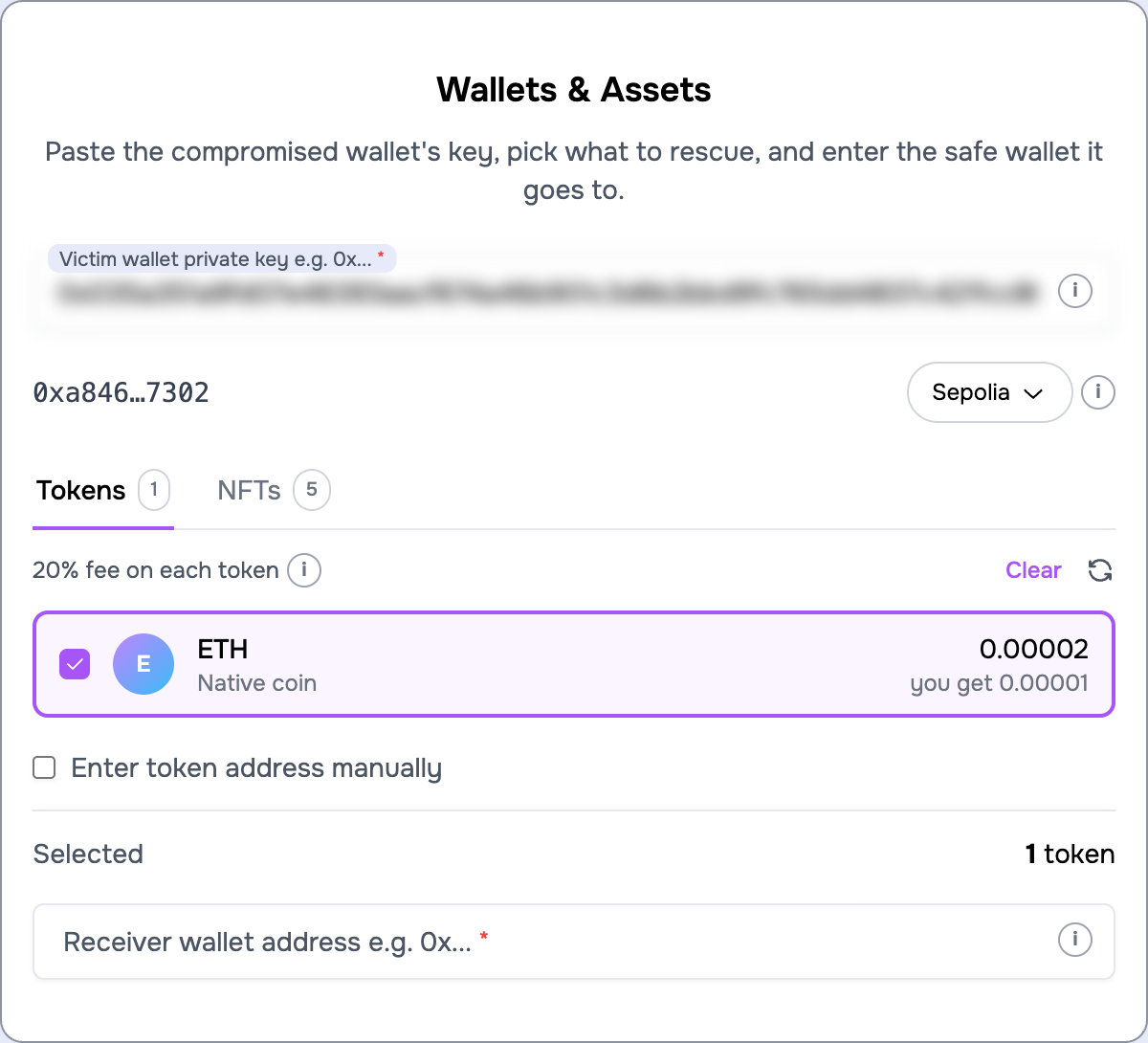
Step 1. Pick the network in the pill next to the address, paste the test key, tick what to rescue, and enter your own address as the safe wallet. If you minted a token and it does not show yet, press the refresh icon.
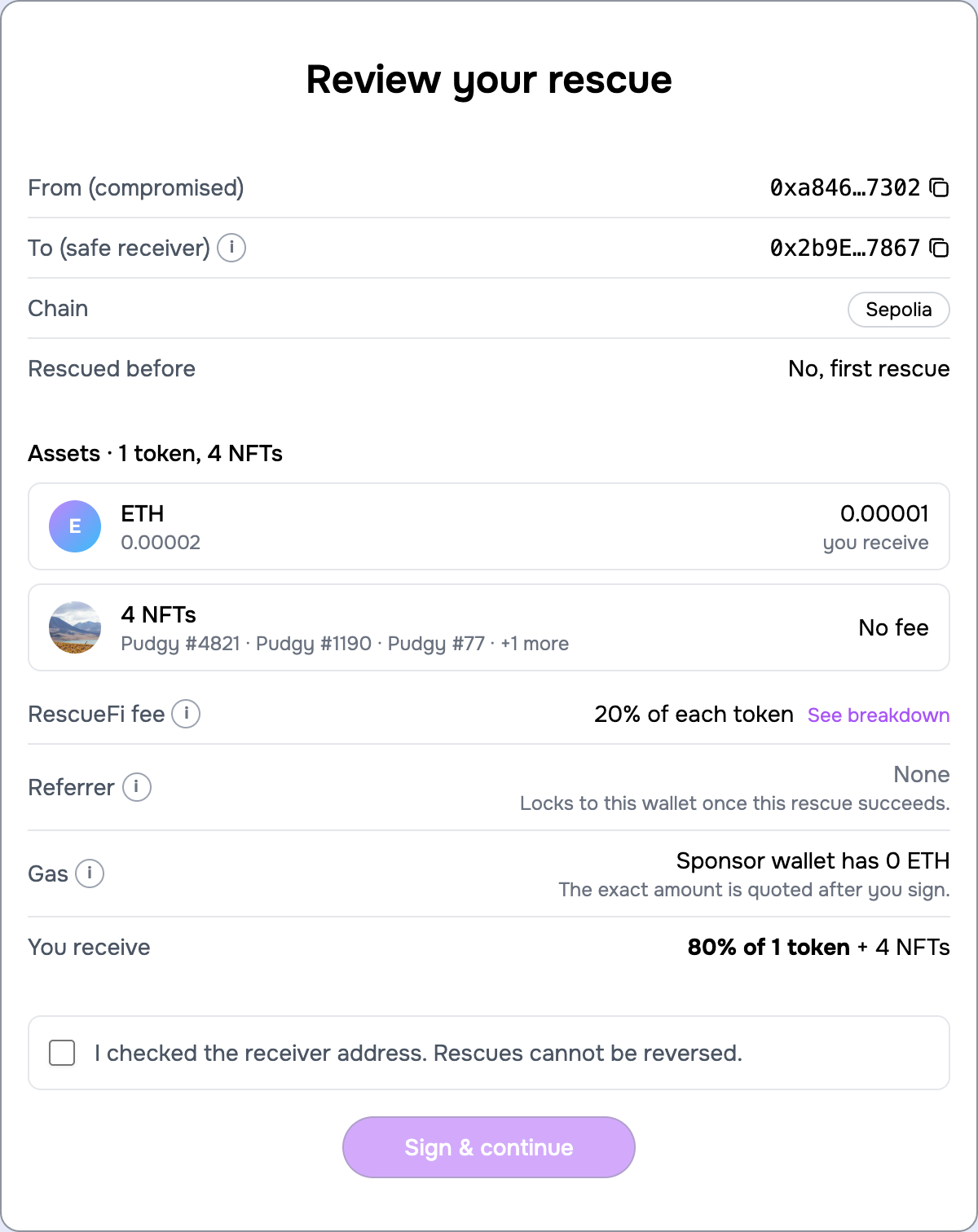
Step 2. Check the review, tick the confirmation and press "Sign & continue". Nothing moves yet; the signatures are made in your browser and are valid for an hour.
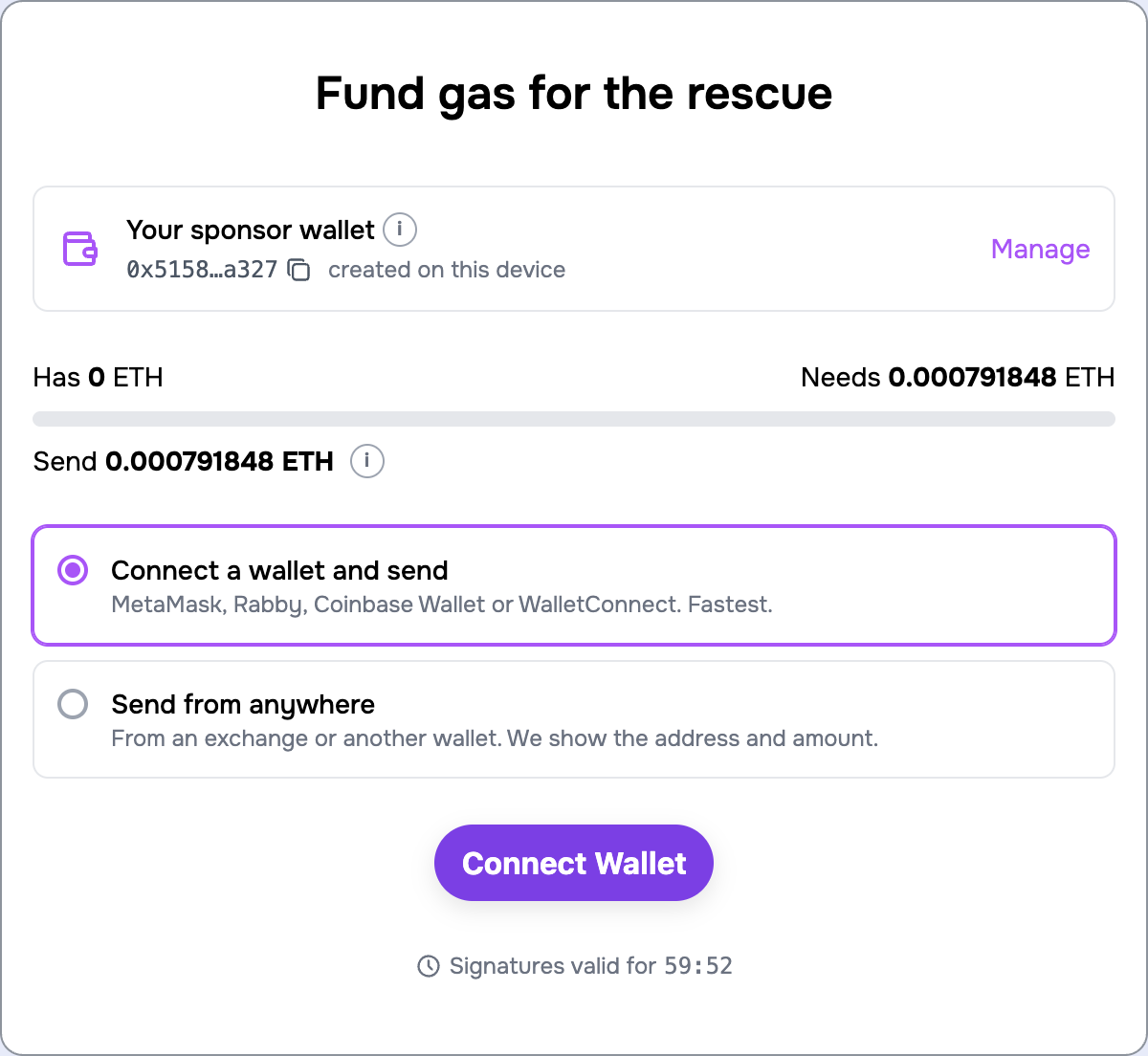
The gas screen tells you what the sponsor wallet needs. Connect your own wallet and press the send button, or pick "Send from anywhere" and send the exact amount from any wallet to the address shown. If your wallet is short of test gas, the faucet link is right there.
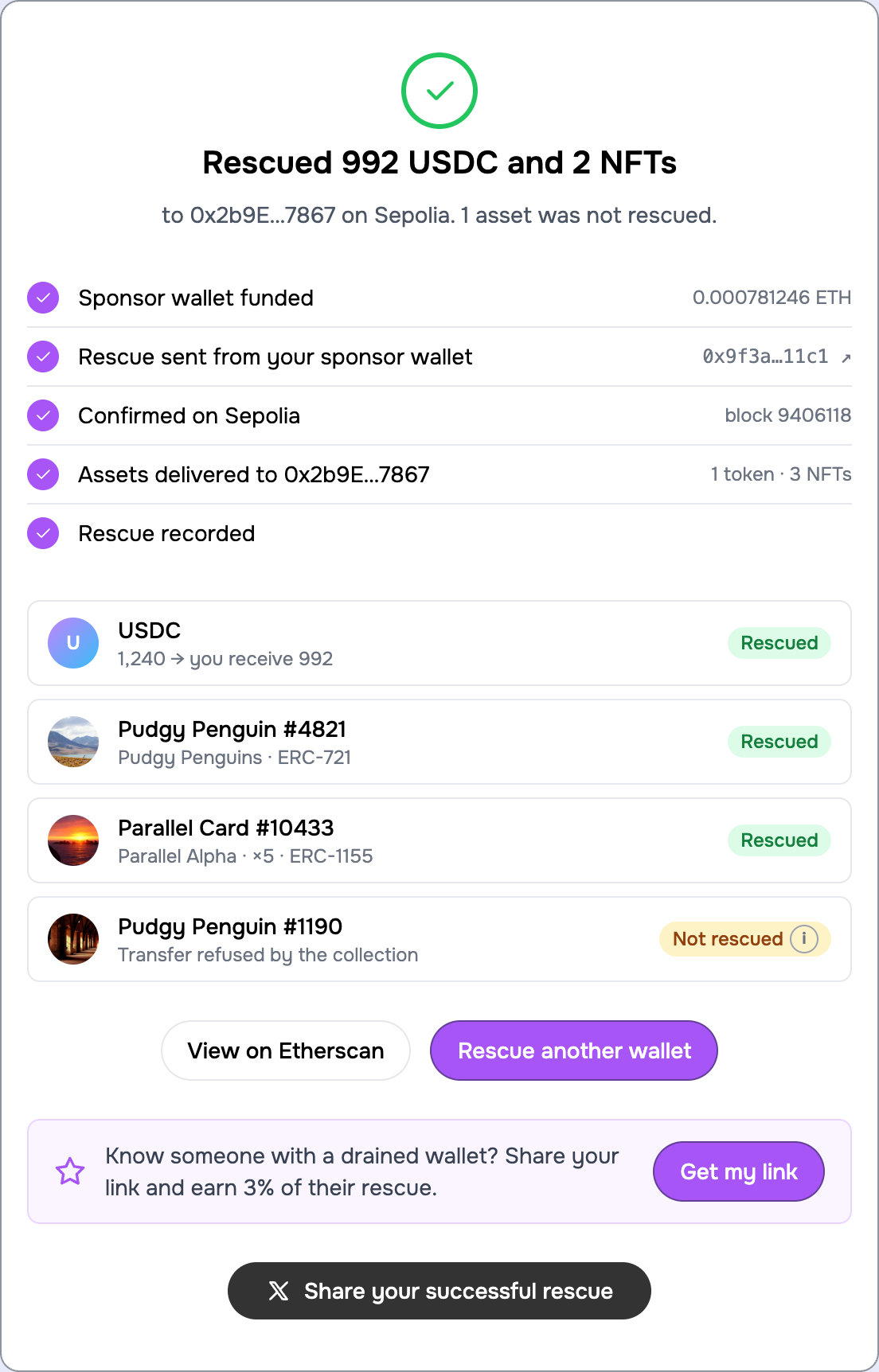
Step 3. The rescue is sent and confirmed, usually within a minute on Sepolia. Each asset shows its outcome. Leftover gas stays in the sponsor wallet for your next test; "Manage" on the gas screen withdraws it.
5. Rescue NFTs too
Mint or transfer any ERC-721 or ERC-1155 to the test wallet, then use the NFTs tab in Step 1. If the collection does not appear automatically on the network, add it by contract address and token ID. See Rescue NFTs.
Where things are recorded
Rescues on the test site are recorded in the test database, so the referral stats and the first-rescue referrer lock behave exactly as on the live site. Nothing you do here has any effect on mainnet.